You can prompt specific moments using ClipBasic or ClipAnything:ClipBasic: Input keywords to help AI identify relevant moments in the video. Ensure the keywords are present in the speech or transcript for accurate results.
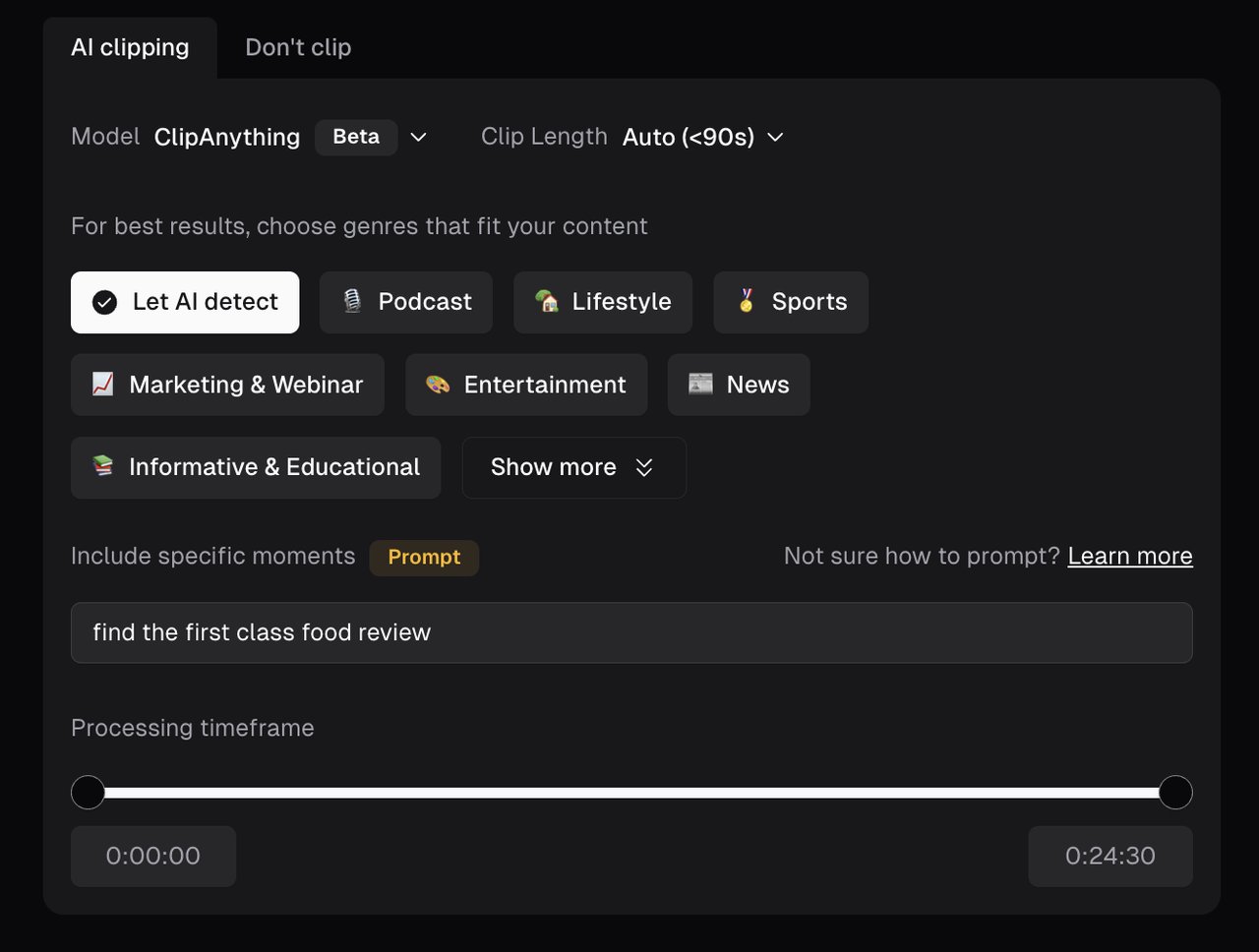
ClipAnything: Use natural language prompts, sentences or keywords to locate scenes, actions, characters, events, emotional moments, viral topics, and more.
To learn more about prompts, please visit ClipAnything Prompts Manual.You can use prompts to get clips in two ways in ClipAnything:
Before project submission in the clips settings section:
In the result page near the top of the screen:
Tip: You can reprompt as many times as you like to get more clips, if you are not satisfied with the results. You will also find suggested prompts that you can try in the input box, and clicking on it will start the process.
Was this page helpful?
{"docsConfig":{"theme":"mint","$schema":"https://mintlify.com/docs.json","name":"Opus Clip","colors":{"primary":"#000000","light":"#ffffff","dark":"#000000"},"logo":{"light":"https://mintcdn.com/opusclip-c3e48c12/H3hvh_QZTOfvCejz/logo/opus_logo.svg?fit=max\u0026auto=format\u0026n=H3hvh_QZTOfvCejz\u0026q=85\u0026s=d92c6d9e8913d19810d8cc3432d7f373","dark":"https://mintcdn.com/opusclip-c3e48c12/H3hvh_QZTOfvCejz/logo/opus_logo.svg?fit=max\u0026auto=format\u0026n=H3hvh_QZTOfvCejz\u0026q=85\u0026s=d92c6d9e8913d19810d8cc3432d7f373"},"favicon":"https://mintcdn.com/opusclip-c3e48c12/CsfV__T0-LAmxfr6/favicon.png?fit=max\u0026auto=format\u0026n=CsfV__T0-LAmxfr6\u0026q=85\u0026s=a0e2b015f6febe3a86f55c9cafcd069c","appearance":{"default":"light","strict":false},"navbar":{"links":[],"primary":{"type":"button","label":"Dashboard","href":"https://clip.opus.pro/dashboard"}},"seo":{"indexing":"all"},"styling":{"codeblocks":"dark","latex":false},"integrations":{"ga4":{"measurementId":"G-CSQE2J78YW"}},"navigation":{"pages":[]}},"deployment":{"deploymentMetadataValue":{"subdomain":"opusclip-c3e48c12","hasAudioNarration":false,"actualSubdomain":"opusclip-c3e48c12","customDomains":["help.opus.pro"],"gitSource":{"type":"github","owner":"opus-pro","repo":"help-center","deployBranch":"main","contentDirectory":"","isPrivate":true,"mountPath":"","label":""},"chroma":{"liveDeploymentHistoryId":"6ae8c66687d830608674e582","collectionId":"af80d224-964b-4ffd-9e1c-f7f991deab5f","schemaVersion":"v3","latestBuiltDeploymentHistoryId":"6ae8c66687d830608674e582"},"feedback":{"thumbs":true},"entitlements":{"AI_CHAT":{"status":"DISABLED"}},"buildId":"6ae8c66687d830608674e582","clientVersion":"0.0.4045","searchFilterCounts":[{"language":"default","tag":"Help Center","count":91},{"language":"default","tag":"API Reference","count":37},{"language":"default","tag":"Edit Your Clips","count":27},{"language":"default","tag":"Endpoints","count":22},{"language":"default","tag":"Opus Labs","count":16},{"language":"default","tag":"Publish Your Projects","count":12},{"language":"default","tag":"Getting started","count":9},{"language":"default","tag":"Customize Your Clips","count":8},{"language":"default","tag":"Manage Your Clips","count":7},{"language":"default","tag":"Collections","count":6}]},"assistantConfig":{},"basePath":"","hasChatPermissions":false,"hasWebMcpPermissions":false,"toggles":[],"googleFontsInlined":false},"customCss":[{"filePath":"style.css","content":".img-frame{background-image:url(https://public.cdn.opus.pro/help-center/help-center-img-bg.png);background-size:cover;aspect-ratio:498/280;border-radius:8px;padding:24px 20px;display:flex;align-items:center;justify-content:center;margin-top:1em;margin-bottom:1em}img{border-radius:6px;margin-top:0!important;margin-bottom:0!important;max-width:100%;max-height:100%;object-fit:contain;object-position:center center}.card:hover{border-color:#000}"}],"page":{"pagePath":"docs/article/select-keywords","slug":"/docs/article/select-keywords","pageMetadata":{"title":"Use Prompts to Clip Specific Moments","description":null,"href":"/docs/article/select-keywords"},"pageType":"default","mdx":{"mdxSource":{"compiledSource":"\"use strict\";const{Fragment:_Fragment,jsx:_jsx,jsxs:_jsxs}=arguments[0];const{useMDXComponents:_provideComponents}=arguments[0];function _createMdxContent(props){const _components={a:`a`,li:`li`,ol:`ol`,p:`p`,strong:`strong`,..._provideComponents(),...props.components},{Tip}=_components;if(!Tip)_missingMdxReference(`Tip`,true);return _jsxs(_Fragment,{children:[_jsx(_components.p,{children:`You can prompt specific moments using ClipBasic or ClipAnything:`}),`\n`,_jsxs(_components.p,{children:[_jsx(_components.strong,{children:`ClipBasic`}),`: Input keywords to help AI identify relevant moments in the video. Ensure the keywords are present in the speech or transcript for accurate results.`]}),`\n`,_jsx(`div`,{className:`img-frame`,children:_jsx(`img`,{src:`https://mintcdn.com/opusclip-c3e48c12/2FSMdgPPp0xAqQFI/images/imgs/keywords-1.png?fit=max\u0026auto=format\u0026n=2FSMdgPPp0xAqQFI\u0026q=85\u0026s=745b837c4056f82e5f5f2f8339e04dab`,noZoom:true,\"data-og-width\":`1280`,width:`1280`,\"data-og-height\":`666`,height:`666`,\"data-path\":`images/imgs/keywords-1.png`,\"data-optimize\":`true`,\"data-opv\":`3`,srcset:`https://mintcdn.com/opusclip-c3e48c12/2FSMdgPPp0xAqQFI/images/imgs/keywords-1.png?w=280\u0026fit=max\u0026auto=format\u0026n=2FSMdgPPp0xAqQFI\u0026q=85\u0026s=880c11eca136c250ea4043566000f54f 280w, https://mintcdn.com/opusclip-c3e48c12/2FSMdgPPp0xAqQFI/images/imgs/keywords-1.png?w=560\u0026fit=max\u0026auto=format\u0026n=2FSMdgPPp0xAqQFI\u0026q=85\u0026s=1688fe70d18ebad0d307a3a49de60dd9 560w, https://mintcdn.com/opusclip-c3e48c12/2FSMdgPPp0xAqQFI/images/imgs/keywords-1.png?w=840\u0026fit=max\u0026auto=format\u0026n=2FSMdgPPp0xAqQFI\u0026q=85\u0026s=ac56fd3fb43a7787a68431569d094c57 840w, https://mintcdn.com/opusclip-c3e48c12/2FSMdgPPp0xAqQFI/images/imgs/keywords-1.png?w=1100\u0026fit=max\u0026auto=format\u0026n=2FSMdgPPp0xAqQFI\u0026q=85\u0026s=3d8b1ddb9eef89d11f9a6796f25941d3 1100w, https://mintcdn.com/opusclip-c3e48c12/2FSMdgPPp0xAqQFI/images/imgs/keywords-1.png?w=1650\u0026fit=max\u0026auto=format\u0026n=2FSMdgPPp0xAqQFI\u0026q=85\u0026s=2dd2a64a3f1f0111013ba10efcc6298b 1650w, https://mintcdn.com/opusclip-c3e48c12/2FSMdgPPp0xAqQFI/images/imgs/keywords-1.png?w=2500\u0026fit=max\u0026auto=format\u0026n=2FSMdgPPp0xAqQFI\u0026q=85\u0026s=a61cb7255ac4b1d4122fc43d8307149c 2500w`})}),`\n`,_jsxs(_components.p,{children:[_jsx(_components.strong,{children:`ClipAnything`}),`: Use natural language prompts, sentences or keywords to locate scenes, actions, characters, events, emotional moments, viral topics, and more.\nTo learn more about prompts, please visit `,_jsx(_components.a,{href:`/docs/article/clip-anything-prompt-manual`,children:`ClipAnything Prompts Manual`}),`.`]}),`\n`,_jsx(_components.p,{children:`You can use prompts to get clips in two ways in ClipAnything:`}),`\n`,_jsxs(_components.ol,{children:[`\n`,_jsx(_components.li,{children:`Before project submission in the clips settings section:`}),`\n`]}),`\n`,_jsx(`div`,{className:`img-frame`,children:_jsx(`img`,{src:`https://mintcdn.com/opusclip-c3e48c12/2FSMdgPPp0xAqQFI/images/imgs/keywords-2.png?fit=max\u0026auto=format\u0026n=2FSMdgPPp0xAqQFI\u0026q=85\u0026s=15f65346b02bc8e4e21bb571f7cbb859`,noZoom:true,\"data-og-width\":`1280`,width:`1280`,\"data-og-height\":`968`,height:`968`,\"data-path\":`images/imgs/keywords-2.png`,\"data-optimize\":`true`,\"data-opv\":`3`,srcset:`https://mintcdn.com/opusclip-c3e48c12/2FSMdgPPp0xAqQFI/images/imgs/keywords-2.png?w=280\u0026fit=max\u0026auto=format\u0026n=2FSMdgPPp0xAqQFI\u0026q=85\u0026s=9a4a206b6452da3733294b24e82663c1 280w, https://mintcdn.com/opusclip-c3e48c12/2FSMdgPPp0xAqQFI/images/imgs/keywords-2.png?w=560\u0026fit=max\u0026auto=format\u0026n=2FSMdgPPp0xAqQFI\u0026q=85\u0026s=3dff8d6bec71c26a69b8514e9119977a 560w, https://mintcdn.com/opusclip-c3e48c12/2FSMdgPPp0xAqQFI/images/imgs/keywords-2.png?w=840\u0026fit=max\u0026auto=format\u0026n=2FSMdgPPp0xAqQFI\u0026q=85\u0026s=fc2da8557d941617464e8f232149c259 840w, https://mintcdn.com/opusclip-c3e48c12/2FSMdgPPp0xAqQFI/images/imgs/keywords-2.png?w=1100\u0026fit=max\u0026auto=format\u0026n=2FSMdgPPp0xAqQFI\u0026q=85\u0026s=fa04da300c5453b8bbb0ef38c56cbb3e 1100w, https://mintcdn.com/opusclip-c3e48c12/2FSMdgPPp0xAqQFI/images/imgs/keywords-2.png?w=1650\u0026fit=max\u0026auto=format\u0026n=2FSMdgPPp0xAqQFI\u0026q=85\u0026s=e40b399d752a9eb737f3082d22338d72 1650w, https://mintcdn.com/opusclip-c3e48c12/2FSMdgPPp0xAqQFI/images/imgs/keywords-2.png?w=2500\u0026fit=max\u0026auto=format\u0026n=2FSMdgPPp0xAqQFI\u0026q=85\u0026s=543d58df226a3f9195d0e03e6185437d 2500w`})}),`\n`,_jsxs(_components.ol,{start:`2`,children:[`\n`,_jsx(_components.li,{children:`In the result page near the top of the screen:`}),`\n`]}),`\n`,_jsx(Tip,{children:`Tip: You can reprompt as many times as you like to get more clips, if you are not satisfied with the results. You will also find suggested prompts that you can try in the input box, and clicking on it will start the process.`}),`\n`,_jsx(`div`,{className:`img-frame`,children:_jsx(`img`,{src:`https://mintcdn.com/opusclip-c3e48c12/2FSMdgPPp0xAqQFI/images/imgs/keywords-3.png?fit=max\u0026auto=format\u0026n=2FSMdgPPp0xAqQFI\u0026q=85\u0026s=94a42823102c5919f825b57b497e35fc`,noZoom:true,\"data-og-width\":`1280`,width:`1280`,\"data-og-height\":`471`,height:`471`,\"data-path\":`images/imgs/keywords-3.png`,\"data-optimize\":`true`,\"data-opv\":`3`,srcset:`https://mintcdn.com/opusclip-c3e48c12/2FSMdgPPp0xAqQFI/images/imgs/keywords-3.png?w=280\u0026fit=max\u0026auto=format\u0026n=2FSMdgPPp0xAqQFI\u0026q=85\u0026s=5afc2b21543fb59de56b2d83288f7b3e 280w, https://mintcdn.com/opusclip-c3e48c12/2FSMdgPPp0xAqQFI/images/imgs/keywords-3.png?w=560\u0026fit=max\u0026auto=format\u0026n=2FSMdgPPp0xAqQFI\u0026q=85\u0026s=be1a2da4ac9d93cfb5912441c563c299 560w, https://mintcdn.com/opusclip-c3e48c12/2FSMdgPPp0xAqQFI/images/imgs/keywords-3.png?w=840\u0026fit=max\u0026auto=format\u0026n=2FSMdgPPp0xAqQFI\u0026q=85\u0026s=68efc4e0af2dbf0c5161fac14dae12d0 840w, https://mintcdn.com/opusclip-c3e48c12/2FSMdgPPp0xAqQFI/images/imgs/keywords-3.png?w=1100\u0026fit=max\u0026auto=format\u0026n=2FSMdgPPp0xAqQFI\u0026q=85\u0026s=4f6e5a46b8ad7d137396fdb82c639885 1100w, https://mintcdn.com/opusclip-c3e48c12/2FSMdgPPp0xAqQFI/images/imgs/keywords-3.png?w=1650\u0026fit=max\u0026auto=format\u0026n=2FSMdgPPp0xAqQFI\u0026q=85\u0026s=b1178a4d41cb418030d25db8b5f2e190 1650w, https://mintcdn.com/opusclip-c3e48c12/2FSMdgPPp0xAqQFI/images/imgs/keywords-3.png?w=2500\u0026fit=max\u0026auto=format\u0026n=2FSMdgPPp0xAqQFI\u0026q=85\u0026s=2c998c10ab3bd7fc1044aab02fe1252e 2500w`})})]})}function MDXContent(props={}){const{wrapper:MDXLayout}={..._provideComponents(),...props.components};return MDXLayout?_jsx(MDXLayout,{...props,children:_jsx(_createMdxContent,{...props})}):_createMdxContent(props)}return{default:MDXContent};function _missingMdxReference(id,component){throw new Error(`Expected `+(component?`component`:`object`)+\" `\"+id+\"` to be defined: you likely forgot to import, pass, or provide it.\")}","frontmatter":{},"scope":{"codeStyling":"dark","config":{},"pageMetadata":{"title":"Use Prompts to Clip Specific Moments","description":null,"href":"/docs/article/select-keywords"}}},"mdxSourceWithNoJs":null},"mdxExtracts":{"tableOfContents":[],"codeExamples":{}},"jsLinks":["/_mintlify/custom/opusclip-c3e48c12/9583f4173dca5195/scripts/mix-panel.js"],"subdomain":"opusclip-c3e48c12","siteName":"Opus Clip","title":"Use Prompts to Clip Specific Moments - Opus Clip","navMaps":{"firstHrefInVersion":{},"firstHrefInLanguage":{}},"lastModified":"2026-11-02T17:21:31.502Z","originalFileLocation":"docs/article/select-keywords.mdx"},"headHtml":"\u003cscript data-mint-head>(function(){var d=document.documentElement,p=null;if(!p){try{p=localStorage.getItem(\"isDarkMode\")}catch(e){}if(p==='true')p='dark';else if(p==='false')p='light';if(p!=='light'\u0026\u0026p!=='dark'\u0026\u0026p!=='system')p=\"light\"}var r=p==='system'?(matchMedia(\"(prefers-color-scheme: dark)\").matches?'dark':'light'):p;d.classList.remove(r==='dark'?'light':'dark');d.classList.add(r);d.setAttribute(\"data-theme-preference\",p)})();\u003c/script>\u003cmeta data-mint-head name=\"application-name\" content=\"Opus Clip\">\u003cmeta data-mint-head name=\"generator\" content=\"Mintlify\">\u003clink data-mint-head rel=\"icon\" type=\"image/png\" sizes=\"192x192\" href=\"/mintlify-assets/_mintlify/favicons/opusclip-c3e48c12/T37nr_pnMgJqW1YU/_generated/favicon/android-chrome-192x192.png\" media=\"(prefers-color-scheme: light)\">\u003clink data-mint-head rel=\"apple-touch-icon\" type=\"image/png\" sizes=\"180x180\" href=\"/mintlify-assets/_mintlify/favicons/opusclip-c3e48c12/T37nr_pnMgJqW1YU/_generated/favicon/apple-touch-icon.png\">\u003clink data-mint-head rel=\"icon\" type=\"image/png\" sizes=\"16x16\" href=\"/mintlify-assets/_mintlify/favicons/opusclip-c3e48c12/T37nr_pnMgJqW1YU/_generated/favicon/favicon-16x16.png\" media=\"(prefers-color-scheme: light)\">\u003clink data-mint-head rel=\"icon\" type=\"image/png\" sizes=\"32x32\" href=\"/mintlify-assets/_mintlify/favicons/opusclip-c3e48c12/T37nr_pnMgJqW1YU/_generated/favicon/favicon-32x32.png\" media=\"(prefers-color-scheme: light)\">\u003clink data-mint-head rel=\"shortcut icon\" type=\"image/x-icon\" href=\"/mintlify-assets/_mintlify/favicons/opusclip-c3e48c12/T37nr_pnMgJqW1YU/_generated/favicon/favicon.ico\" media=\"(prefers-color-scheme: light)\">\u003clink data-mint-head rel=\"icon\" type=\"image/png\" sizes=\"192x192\" href=\"/mintlify-assets/_mintlify/favicons/opusclip-c3e48c12/T37nr_pnMgJqW1YU/_generated/favicon-dark/android-chrome-192x192.png\" media=\"(prefers-color-scheme: dark)\">\u003clink data-mint-head rel=\"icon\" type=\"image/png\" sizes=\"16x16\" href=\"/mintlify-assets/_mintlify/favicons/opusclip-c3e48c12/T37nr_pnMgJqW1YU/_generated/favicon-dark/favicon-16x16.png\" media=\"(prefers-color-scheme: dark)\">\u003clink data-mint-head rel=\"icon\" type=\"image/png\" sizes=\"32x32\" href=\"/mintlify-assets/_mintlify/favicons/opusclip-c3e48c12/T37nr_pnMgJqW1YU/_generated/favicon-dark/favicon-32x32.png\" media=\"(prefers-color-scheme: dark)\">\u003clink data-mint-head rel=\"shortcut icon\" type=\"image/x-icon\" href=\"/mintlify-assets/_mintlify/favicons/opusclip-c3e48c12/T37nr_pnMgJqW1YU/_generated/favicon-dark/favicon.ico\" media=\"(prefers-color-scheme: dark)\">\u003cmeta data-mint-head property=\"og:title\" content=\"Use Prompts to Clip Specific Moments - Opus Clip\">\u003cmeta data-mint-head property=\"og:site_name\" content=\"Opus Clip\">\u003cmeta data-mint-head property=\"og:url\" content=\"https://help.opus.pro/docs/article/select-keywords\">\u003cmeta data-mint-head property=\"og:type\" content=\"website\">\u003cmeta data-mint-head property=\"og:image\" content=\"https://opusclip-c3e48c12.mintlify.app/_mintlify/api/og/v2?division=Customize+Your+Clips\u0026amp;title=Use+Prompts+to+Clip+Specific+Moments\u0026amp;theme=c96f4f889348479cb34b476b\u0026amp;signature=0ddf3d24e240b503ec5fc43abfac08c704525d1d5f22a817822dc5c3d31cf992\">\u003cmeta data-mint-head property=\"og:image:width\" content=\"1200\">\u003cmeta data-mint-head property=\"og:image:height\" content=\"630\">\u003cmeta data-mint-head name=\"twitter:card\" content=\"summary_large_image\">\u003cmeta data-mint-head name=\"twitter:title\" content=\"Use Prompts to Clip Specific Moments - Opus Clip\">\u003cmeta data-mint-head name=\"twitter:image\" content=\"https://opusclip-c3e48c12.mintlify.app/_mintlify/api/og/v2?division=Customize+Your+Clips\u0026amp;title=Use+Prompts+to+Clip+Specific+Moments\u0026amp;theme=c96f4f889348479cb34b476b\u0026amp;signature=0ddf3d24e240b503ec5fc43abfac08c704525d1d5f22a817822dc5c3d31cf992\">\u003cmeta data-mint-head name=\"twitter:image:width\" content=\"1200\">\u003cmeta data-mint-head name=\"twitter:image:height\" content=\"630\">\u003cmeta data-mint-head name=\"msapplication-config\" content=\"/mintlify-assets/_mintlify/favicons/opusclip-c3e48c12/T37nr_pnMgJqW1YU/_generated/favicon/browserconfig.xml\">\u003cmeta data-mint-head name=\"apple-mobile-web-app-title\" content=\"Opus Clip\">\u003cmeta data-mint-head name=\"msapplication-TileColor\" content=\"#000000\">\u003clink data-mint-head rel=\"canonical\" href=\"https://help.opus.pro/docs/article/select-keywords\">\u003clink data-mint-head rel=\"alternate\" type=\"application/xml\" href=\"/sitemap.xml\">\u003clink data-mint-head rel=\"alternate\" type=\"text/markdown\" href=\"/docs/article/select-keywords.md\">\u003cscript data-mint-head type=\"application/ld+json\">{\"@context\":\"https://schema.org\",\"@graph\":[{\"@type\":\"Organization\",\"@id\":\"https://help.opus.pro/#organization\",\"name\":\"Opus Clip\",\"url\":\"https://help.opus.pro\",\"logo\":{\"@type\":\"ImageObject\",\"url\":\"https://mintcdn.com/opusclip-c3e48c12/H3hvh_QZTOfvCejz/logo/opus_logo.svg?fit=max\u0026auto=format\u0026n=H3hvh_QZTOfvCejz\u0026q=85\u0026s=d92c6d9e8913d19810d8cc3432d7f373\"}},{\"@type\":\"WebSite\",\"@id\":\"https://help.opus.pro#website\",\"name\":\"Opus Clip\",\"url\":\"https://help.opus.pro\",\"publisher\":{\"@id\":\"https://help.opus.pro/#organization\"}},{\"@type\":\"WebPage\",\"@id\":\"https://help.opus.pro/docs/article/select-keywords#webpage\",\"url\":\"https://help.opus.pro/docs/article/select-keywords\",\"name\":\"Use Prompts to Clip Specific Moments\",\"dateModified\":\"2026-11-02T17:21:31.502Z\",\"isPartOf\":{\"@id\":\"https://help.opus.pro#website\"},\"breadcrumb\":{\"@id\":\"https://help.opus.pro/docs/article/select-keywords#breadcrumb\"}},{\"@type\":\"BreadcrumbList\",\"@id\":\"https://help.opus.pro/docs/article/select-keywords#breadcrumb\",\"itemListElement\":[{\"@type\":\"ListItem\",\"position\":1,\"name\":\"Customize Your Clips\",\"item\":\"https://help.opus.pro/docs/article/how-to-use-brand-kit\"},{\"@type\":\"ListItem\",\"position\":2,\"name\":\"Use Prompts to Clip Specific Moments\",\"item\":\"https://help.opus.pro/docs/article/select-keywords\"}]},{\"@type\":[\"Article\",\"TechArticle\"],\"@id\":\"https://help.opus.pro/docs/article/select-keywords#article\",\"headline\":\"Use Prompts to Clip Specific Moments\",\"name\":\"Use Prompts to Clip Specific Moments\",\"url\":\"https://help.opus.pro/docs/article/select-keywords\",\"mainEntityOfPage\":{\"@id\":\"https://help.opus.pro/docs/article/select-keywords#webpage\"},\"dateModified\":\"2026-11-02T17:21:31.502Z\",\"publisher\":{\"@id\":\"https://help.opus.pro/#organization\"},\"isPartOf\":{\"@id\":\"https://help.opus.pro#website\"}}]}\u003c/script>\u003cscript data-mint-head type=\"application/ld+json\">{\"@context\":\"https://schema.org\",\"@type\":\"WebSite\",\"name\":\"Opus Clip\",\"creator\":{\"@type\":\"Organization\",\"name\":\"Mintlify\",\"url\":\"https://mintlify.com\"}}\u003c/script>","siteName":"Opus Clip","nav":{"global":null,"tabs":[{"tab":"Help Center","hidden":false,"groups":[{"group":"Getting Started","pages":[{"title":"Introduction to OpusClip","href":"/docs/article/introduction-to-opusclip"},{"title":"Things You Should Set Up First","href":"/docs/article/things-you-should-set-up-first"},{"title":"Email Login","href":"/docs/article/email-login"}]},{"group":"🌟 ClipAnything","pages":[{"title":"What is ClipAnything?","href":"/docs/article/9947095-clip-anything"},{"title":"How to use ClipAnything?","href":"/docs/article/how-to-use-clipanything"},{"title":"ClipAnything Prompts Manual","href":"/docs/article/clip-anything-prompt-manual"},{"title":"ClipAnything FAQ","href":"/docs/article/clipanything-qa"}]},{"group":"OpusSearch","pages":[{"title":"OpusSearch","href":"/docs/article/opussearch"}]},{"group":"Submit Your Videos","pages":[{"title":"Video Sources Supported","href":"/docs/article/video-sources-supported"},{"title":"Video Length Supported","href":"/docs/article/video-length"},{"title":"Local File Uploads","href":"/docs/article/local-file-uploads"},{"title":"Video Languages Supported","href":"/docs/article/video-languages-supported"},{"title":"Auto Import Your Latest YouTube Videos","href":"/docs/article/auto-import"},{"title":"Upload Your Own SRT Along With The Video","href":"/docs/article/upload-own-srt"}]},{"group":"Recipes","pages":[{"title":"How to Use Recipes","href":"/docs/article/how-to-use-recipes"},{"title":"Create and Save a Custom Recipe","href":"/docs/article/create-and-save-a-custom-recipe"},{"title":"Edit, Rename, Duplicate, or Delete a Recipe","href":"/docs/article/edit-rename-duplicate-or-delete-a-recipe"},{"title":"How Do Recipes and Brand Kit Work Together?","href":"/docs/article/how-do-recipes-and-brand-kit-work-together"}]},{"group":"Customize Your Clips","pages":[{"title":"How to Use Brand Kit","href":"/docs/article/how-to-use-brand-kit"},{"title":"Add Logo and Custom Fonts","href":"/docs/article/custom-fonts"},{"title":"Change Aspect Ratio","href":"/docs/article/adjust-the-aspect-ratio"},{"title":"Select your Clip Length","href":"/docs/article/select-clip-length"},{"title":"Clip a Specific Timeframe","description":null,"href":"/docs/article/select-timeframe"},{"title":"Use Prompts to Clip Specific Moments","href":"/docs/article/select-keywords"},{"title":"Translate Subtitles to Another Language","description":null,"href":"/docs/article/select-subtitle-language"},{"title":"Brand Vocabulary","href":"/docs/article/brand-vocabulary"}]},{"group":"Get Your Clips","pages":[{"title":"How Many Clips Can I Get?","href":"/docs/article/how-many-clips"},{"title":"Refunding a Project","href":"/docs/article/can-i-reprocess-a-project"},{"title":"Get Your Clips FAQ","href":"/docs/article/get-clips-faq"}]},{"group":"Edit Your Clips","pages":[{"title":"Adjust Layout","href":"/docs/article/apply-the-layouts"},{"title":"Manual Reframe","href":"/docs/article/how-to-manually-reframe-content"},{"title":"Subject Tracking","href":"/docs/article/subject-tracking"},{"title":"Change or Remove Captions","href":"/docs/article/change-captions"},{"title":"AI Emojis/Keywords","href":"/docs/article/ai-emojis-keywords"},{"title":"Trim and Extend the Video","href":"/docs/article/trim-extend-the-video"},{"title":"Add Text Overlays","href":"/docs/article/add-text-overlays"},{"title":"Add Transition Effects","href":"/docs/article/add-transition-effects"},{"title":"Speech Cleanup","href":"/docs/article/speech-cleanup"},{"title":"Add B-roll to your video","href":"/docs/article/ai-broll"},{"title":"AI Voiceover","href":"/docs/article/ai-voiceover"},{"title":"Add Intro/Outro Cards","href":"/docs/article/intro-outro-cards"},{"title":"Upload Custom Media Assets","href":"/docs/article/upload-media"},{"title":"Add Music","href":"/docs/article/add-music-to-your-clips"},{"title":"Keyboard Editing Shortcuts","href":"/docs/article/keyboard-precise-editing"},{"title":"Rearrange Scenes in the Timeline","href":"/docs/article/can-i-drag-rearrange-sections-timeline"},{"title":"How to Censor Curse Words","href":"/docs/article/how-to-censor-curse-words"},{"title":"Snap Editing","href":"/docs/article/snap-editing"},{"title":"Auto headline","href":"/docs/article/auto-headline"},{"title":"Add a Viral Hook to your video","href":"/docs/article/add-a-viral-hook"},{"title":"Add motion graphics to your video","href":"/docs/article/add-motion-graphics"},{"title":"Fix lighting and color with Auto color correction","href":"/docs/article/auto-color-correction"},{"title":"Duplicate Clips","href":"/docs/article/duplicate-clips"},{"title":"Upscale a Video","href":"/docs/article/upscale-a-video"},{"title":"Video Clone \u0026 Dubbing","href":"/docs/article/video-dubbing"},{"title":"Add sound effects automatically with Auto SFX","href":"/docs/article/auto-sfx"},{"title":"How to Use Eye Contact Correction","href":"/docs/article/eye-contact-correction"}]},{"group":"Manage Your Clips","pages":[{"title":"Saving Your Projects","href":"/docs/article/saving-your-projects"},{"title":"Collections","href":"/docs/article/collections"},{"title":"Share Projects with Collaborators","href":"/docs/article/share-project"},{"title":"Bulk Download","href":"/docs/article/bulk-download"},{"title":"Download and Post in 4K","href":"/docs/article/download-and-post-in-4k"},{"title":"Delete a Project","href":"/docs/article/deleting-a-project"},{"title":"Cloud Storage","href":"/docs/article/cloud-storage"}]},{"group":"Publish Your Projects","pages":[{"title":"Add Social Accounts","href":"/docs/article/add-social-accounts"},{"title":"Why Can't I Connect My Facebook Account?","href":"/docs/article/why-cant-i-connect-facebook-account"},{"title":"Schedule Your Clips","href":"/docs/article/schedule-clips"},{"title":"Set a Custom Thumbnail","href":"/docs/article/set-a-custom-thumbnail"},{"title":"Customize My Posts","href":"/docs/article/9747769-customize-my-posts"},{"title":"Scheduler FAQ","href":"/docs/article/scheduler-faq"},{"title":"Connecting Your YouTube Channel Account","href":"/docs/article/connecting-youtube-channel-account"},{"title":"Connecting Your Instagram Professional Account (Business or Creator accounts)","href":"/docs/article/connecting-your-instagram-account"},{"title":"Instagram Login Errors","href":"/docs/article/instagram-login-errors"},{"title":"Bulk Scheduler","href":"/docs/article/bulk-scheduler"},{"title":"How to post to TikTok","href":"/docs/article/how-to-post-to-tiktok"},{"title":"What is the Virality Score on OpusClip?","href":"/docs/article/virality-score"}]},{"group":"Export to XML","pages":[{"title":"Import to Adobe Premiere FAQ","sidebarTitle":"Import to Adobe Premiere Pro","href":"/docs/article/import-to-adobe-premiere"},{"title":"Import to DaVinci Resolve FAQ","sidebarTitle":"Import to DaVinci Resolve","href":"/docs/article/import-to-davinci-resolve"}]},{"group":"Team Workspace","pages":[{"title":"Team Management","href":"/docs/article/6219255-team-management"}]},{"group":"Account Management","pages":[{"title":"Email Notification Settings","href":"/docs/article/email-notification-settings"}]},{"group":"Billing and Payment","pages":[{"title":"How Do Credits Work?","href":"/docs/article/how-are-credits-consumed"},{"title":"Plans","href":"/docs/article/plans-and-credits"},{"title":"Upgrade \u0026 Downgrade","href":"/docs/article/7285187-credit-related-questions"},{"title":"Payments \u0026 Billing info","href":"/docs/article/payments-and-billing-info"}]},{"group":"API \u0026 Integration","pages":[{"title":"API Requests","href":"/docs/article/api-requests"},{"title":"Zapier Integration","href":"/docs/article/zapier-integration"},{"title":"Create Zaps with Google Drive","href":"/docs/article/create-zaps-google-drive"}]},{"group":"Other Questions","pages":[{"title":"Apply to Become an Affiliate!","sidebarTitle":"Become an Affiliate","href":"/docs/article/apply-to-become-an-affiliate"},{"title":"Requesting a feature?","sidebarTitle":"Request a Feature","href":"/docs/article/request-a-feature"},{"title":"What are OpusClip's data security standards?","sidebarTitle":"Privacy \u0026 Security","href":"/docs/article/opusclip-data-security-standards"},{"title":"Editor Browser Use FAQ","href":"/docs/article/editor-browser-use-faq"},{"title":"Features Not Included in the Free Trial","href":"/docs/article/features-not-included-free-trial"}]}]},{"tab":"Learning Center","href":"https://www.opus.pro/learning-center?utm_campaign=help-center"},{"tab":"API Reference","pages":[{"title":"API Reference","href":"/api-reference/overview"}]},{"tab":"Agent Opus FAQ","pages":[{"title":"Agent Opus FAQ","href":"/agent-opus/article/ao-faq"}]},{"tab":"Opus Labs","pages":[{"title":"Opus Labs","href":"/opus-labs/overview"}]}]},"basePath":"","title":"Use Prompts to Clip Specific Moments - Opus Clip","buildId":"dpl_36EDyZCDfRuoUD9af5CH4M1bqY2h","deploymentId":"dpl_36EDyZCDfRuoUD9af5CH4M1bqY2h","dynamics":[],"chunks":[]}