
Reward credits from both programs are separate from the monthly credits included with your plan. See the Agent Opus Credits FAQ for how those work.
Onboarding rewards
1. What onboarding rewards are
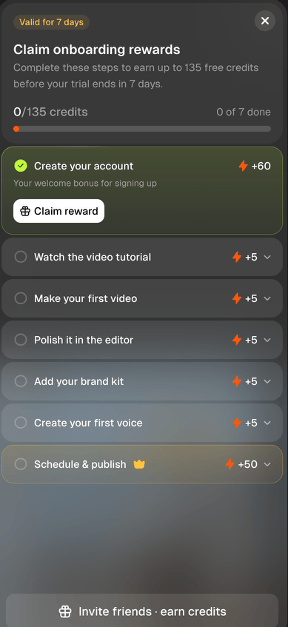
Onboarding rewards are a limited program for new Free and Trial accounts. Each reward is tied to a short, one-time setup step that introduces a part of Agent Opus, such as making your first video or adding a brand kit. There are seven steps, worth 135 credits in total.2. Where to find your rewards
There are three ways into the rewards panel:- The welcome pop-up. Appears the first time you open Agent Opus after signing up. Select Claim reward to bank your welcome bonus and open the panel.
- The rewards launcher. Sits in the corner of the screen and stays there until every reward is claimed.
- The notification bell. Look for “Your setup rewards are waiting.”
3. What counts as a step
Each step is a short, one-time action, and every card tells you what to do and what it pays. Some steps unlock in sequence rather than all at once, because they build on each other. Polishing a video in the editor only becomes available once you have a video to polish. The list of steps changes as we improve the program, so your panel is always the accurate version for your account.4. What each step pays
Create your account is your welcome bonus for signing up, so it is already complete when you first open the panel. You still have to claim it. Schedule and publish is a Pro step, marked with a crown.
Amounts change as we tune the program and can differ between accounts. The panel header shows the total you can still earn, and every card shows its own amount, so read the number off your own panel.
5. How to claim a reward
Rewards are not added automatically. Each step moves through three states:- Available. Select the card and Agent Opus takes you to the place where you complete the step.
- Ready to claim. You finished the step, and the card turns green with a Claim reward button.
- Claimed. The credits are in your balance.
6. Two deadlines to know about
Onboarding rewards have two separate clocks, and they measure different things.
Claiming early costs you nothing. A claimed reward starts its 30 days, but an unclaimed one disappears entirely when the first clock ends, so claim as you go.
7. Why you may not see the rewards panel
Onboarding rewards are a limited program for new accounts. You will not see the panel if:- Your account is on a paid plan. Onboarding rewards are for Free and Trial accounts. Referrals are not affected.
- Onboarding rewards are not available in your region yet. Availability is rolling out by region. For where Agent Opus itself is available, see Supported Regions.
- Your account was not brand new when you first opened Agent Opus, or your 7-day earning window has already ended.
- We have not rolled it out to your account yet. We are releasing onboarding rewards gradually, so it may not appear on every new account.
Referrals
8. How referrals work
Share your referral link. When a friend signs up through it, you both get credits, and you both get more if they upgrade. Rewards land automatically, and there is no code to enter. Unlike onboarding rewards, referrals have no steps to complete and no 7-day earning window, and they are not limited to new accounts. Open the referral panel from Invite friends at the bottom of the rewards panel. The referral panel, reached from Invite friends.
9. What each referral pays
Both sides of a referral earn the same amount. Upgrade rewards only pay if your friend upgrades within one week of signing up. Referral earnings are capped at 1,500 credits a month.