> ## Documentation Index
> Fetch the complete documentation index at: https://help.opus.pro/llms.txt
> Use this file to discover all available pages before exploring further.
# Connecting Your YouTube Channel Account
With the largest global audience of any video platform, YouTube delivers unmatched reach across desktop and mobile. Maximize your impact on this powerhouse platform using OpusClip's **YouTube Shorts scheduling** and **content planning tools** to grow your audience efficiently.
## Getting Started
1. **Set Up a YouTube Channel**
* A YouTube channel is separate from your Google Account.
* Don’t have one yet? Check out [how to create a YouTube channel here](https://support.google.com/youtube/answer/1646861?hl=en).
2. **Connect Your Channel to OpusClip**
* **Pro users** can connect to **multiple YouTube channels**.
* *Before connecting*:
* Log into the **Google Account that owns your YouTube channel** in a separate browser tab.
* This ensures OpusClip accesses the correct channel.
**Important Notice**:
Due to YouTube’s API restrictions:
* **You must log in with the Google Account that owns the YouTube channel** to connect it to OpusClip.
* **Unfortunately, we are NOT able to connect to a YouTube channel if you are set as a manager of the brand account**.
## Troubleshooting Access Issues
1. Log out of all other Google Accounts in your browser.
2. **Only log into the Google Account that owns your YouTube channel** before connecting to OpusClip.
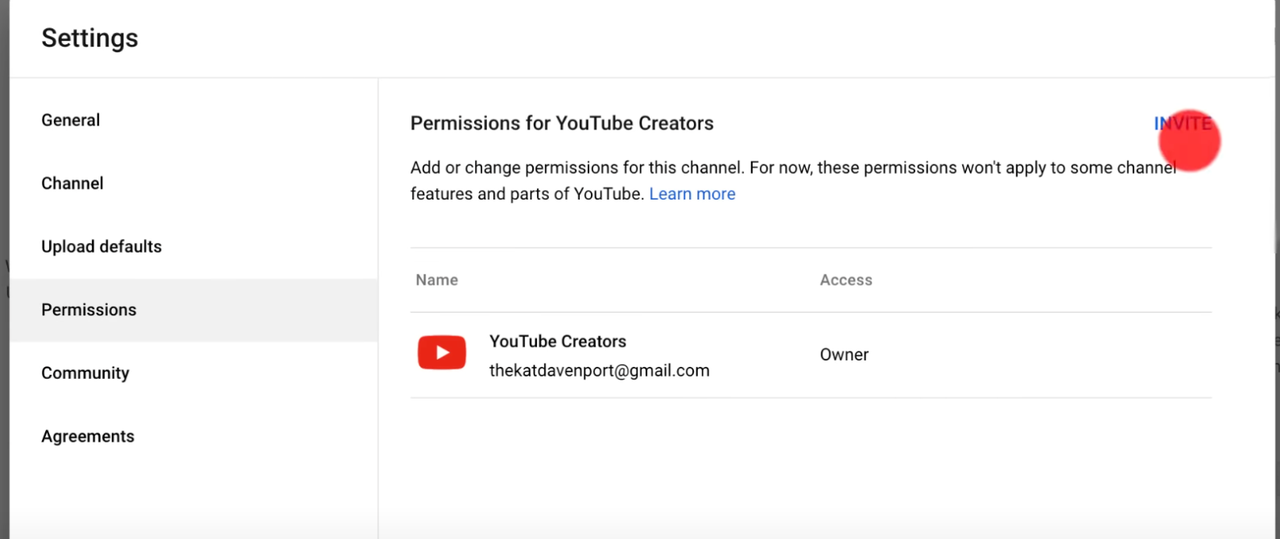
3. Confirm ownership in [YouTube Studio](https://studio.youtube.com/channel/) under **Permissions** (Settings > Permissions).
Still stuck? Please contact Support if you believe you're the owner but are encountering errors.